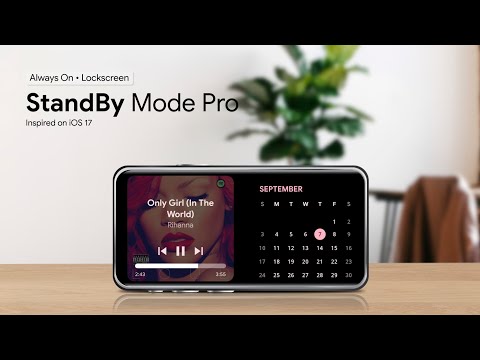
StandBy Mode brings the iOS StandBy screen to Android: an always on display (AOD) desk clock and night clock with widgets, shown while your phone, tablet or foldable charges. Next to the clock you can show your music, calendar, weather and more, large enough to read from across the room.
Choose from more than 100 clock faces, put two, three or four widgets side by side, and set the app to open by itself when you plug in the charger.
Full screen clocks
Digital clock with date, segmented LCD clock, flip clock, neon clock, analog clock with digital time, solar clock, Matrix, pixel art, word clock, Roman numerals, world clock and a big Pixel-style crop clock. Each one lets you change colors, fonts and sizes, so the same app works as a bedside clock or as a desk clock in a home office. The dementia clock shows the full date, the day of the week and the time of day (morning, afternoon, night) in large text.
Always on display and night mode
The AMOLED clock shows white digits on pure black, which makes it a good night clock: you can check the time without lighting up the room. Night Mode dims the screen and tints it red, on a schedule or with the light sensor, and you can set a separate brightness for day and night. Pixel shifting helps protect OLED screens from burn-in, and a sleep timer can turn the screen off after a set time.
Starts and stops on its own
Open the app when you plug in, only on wireless charging, only on Wi-Fi, only when the screen is off, or on a schedule. It can appear over the lock screen and close again when you unplug, and it also works as the Android screensaver, so the clock shows up when the device is docked or idle. The charging screen shows the battery level and how long until it is full.
Widgets side by side
In the Duo layout, the most used widgets are the digital clock, the music player, the calendar and the System Dashboard, which shows battery and storage. There are also analog and AMOLED clocks, battery widgets in several styles, weather, photos, quotes, GIFs, a to-do list, timers and any widget from the apps on your home screen. Small complications on the edges of any screen add the next alarm, the date, battery or progress through the year. The widget rotator can cycle through your favorites.
Music player with lyrics
Control Spotify, YouTube Music, Apple Music, Deezer and other apps from a music widget or a full screen player that shows the lyrics as the song plays.
Digital photo frame and weather clock
Use an old phone or tablet as a photo frame; the crop follows faces, so people stay in the picture. Weather clocks put the current weather and the forecast next to the time.
Focus and productivity
Pomodoro timer with focus insights, full screen timer, countdown, stopwatch, calendar agenda, tally counters, a sobriety counter and a calculator. Focus mode lets you pick which notifications can appear while StandBy Mode is open, and Spaces keep separate setups for home, work and focus.
Dashboards and extras
Command Center puts the clock, weather, agenda, audio and battery on one screen, and Starship Console shows the clock, weather, schedule and power readouts as a retro sci-fi display. Vibes plays lo-fi and study radio over calm visuals, and seasonal effects add falling snow in winter.
Phones, tablets and foldables
Turn an old tablet into a smart display on the kitchen counter or the nightstand. The app works in landscape and portrait and is translated into more than 20 languages.
Privacy policy: https://zetabitapps.com/privacy-policy
Support: [email protected]
NEW
• Alarms: Wake up to a video or your ringtone
• News: The changelog is now News, with Updates and Blog tabs
• Screensaver: Every widget group, including Duo
FIXES & IMPROVEMENTS
• Timer: Fix countdown running too fast
• Quick Launch: Fix closing on the charger, close on pick-up
• Calendar: Hide declined and cancelled events
• Schedule: Show multi-day events on every day
• Segmented Clock: Background color is back
• Duo: Fix crash on Android 11
• Fix some crashes
NEW
• Consistent haptic feedback across the app
• Duo: Widget stacks now loop like iOS StandBy
• Segmented Clock: Blinking separator option
• Calendar Mini: Shows your next event
FIXES & IMPROVEMENTS
• PERFORMANCE: Lower battery and memory use while on screen
• Leave the app with one swipe on gesture navigation
• Quick Launch: Fix auto launch on Android 15+
• Double tap to close: Fix app closing when tapping buttons
• Fix some crashes
New: Sober Counter, a streak counter for anything you've given up. It shows the days, hours, and minutes since you started, the next milestone, and the money you've saved so far. At night it dims to a single color on pure black. Works in Duo.
Also:
- Choose Cascade, Big count, or Streak grid
- Discreet mode hides what you're tracking and the money saved
- Had a slip? Restart from now and your clean days stay in your history
Happy New Year!
NEW
• Quotes: You can now share them and see in your own language
• Photos: Adaptive layout toggle - control whether to show 1 full-screen photo or 2 photos when orientation doesn't match
• Vibes: Free users can now add 2 custom Vibes
FIXES & IMPROVEMENTS
• Sleep Timer: Fixed starry sky animation preventing screen from turning off
• Fixed Google Sign-In error
• Crash fixes & library updates to keep the app running smoothly
NEW
• Automatic photo switching with filter chips (15s to 10min)
• More font options for Photos/Vibes clock customization
• Shrink panel in landscape for easier customization
FIXES & IMPROVEMENTS
• Optimized font files - App is now 8.4MB smaller
• Fixed Duo showing 2 pictures - now shows one at a time
• Fixed billing and subscription restoration
PREMIUM
• PhotoStack: Make your photos fly in a fun montage
• Photos: Add entire folders to your photos
PREMIUM
• Add new Aquarium quotes theme
FIXES & IMPROVEMENTS
• Fix double click interfering in some scenarios
• Improve charging detection
• Fix bugs on Samsung One UI coloring
• Fix app not launching on Samsung One UI 7
• Quotes: Add 20 new quotes
PREMIUM
• New Pixel Art Clock (Premium exclusive)
• Add Calculator Widget
NEW
• DUO is now resizable
• Tablets and large devices can have set a Quad mode on Duo
• Sleep Timer now can turn off the screen
• Add new option to launch the app only when connected to Wifi
FIXES & IMPROVEMENTS
• Minimum sleep timer is now 30 seconds
PREMIUM
• Add transition option for Photos
• New Pixel Art Clock (Premium exclusive)
NEW
• DUO/QUAD is now resizable
• Add new option to launch the app only when connected to Wifi
• Minimum sleep timer is now 30 seconds
FIXES & IMPROVEMENTS
• Fix some layout errors
• Updates to Jetpack Compose
PREMIUM
• New Pixel Art Clock (Premium exclusive)
NEW
• DUO is now resizable
• Tablets and large devices can have set a Quad mode on Duo
• Sleep Timer now can turn off the screen
FIXES & IMPROVEMENTS
• Fix some layout errors
• Updates to Jetpack Compose
PREMIUM
• New Pixel Art Clock (Premium exclusive)
NEW
• DUO is now resizable
• Tablets and large devices can have set a Quad mode on Duo
FIXES & IMPROVEMENTS
• Fix some layout errors
• Updates to Jetpack Compose
PREMIUM
• New Pixel Art Clock (Premium exclusive)
NEW
• DUO is now resizable
• Tablets and large devices can have set a Quad mode on Duo
FIXES & IMPROVEMENTS
• Fix some layout errors
• Updates to Jetpack Compose
PREMIUM
• New Pixel Art Clock (Premium exclusive)
NEW
• Kelvin temperature support
• [ALPHA] Screen Saver Mode (in Device Settings)
• [BETA] Export/Import setup (in labs)
FIXES & IMPROVEMENTS
• Fixed US date order in Segmented Clock
• Sensor Night Mode delay increased to 5s to prevent flickering
• Translation & locale improvements
• Fixed Battery Speedometer unit conversion
• Fixed app launch icon orientation
NEW
• Introducing Sleep Timer: After a set time the device's screen will go dark. Optionally, you can also show the sky
PREMIUM
• You can now disable the navigation entirely for a cleaner look
FIXES & IMPROVEMENTS
• Bring "Only Wireless Charging" back to Quick Launch
NEW
• Introducing Sleep Timer: After a set time the device's screen will go dark. Optionally, you can also show the sky
PREMIUM
• You can now disable the navigation entirely for a cleaner look
FIXES & IMPROVEMENTS
• Fix mismatch languages, in app language setting should work properly now
• Improve UX and responsiveness for new navigation, specially on tablets
NEW
• Introducing Sleep Timer: After a set time the device's screen will go dark. Optionally, you can also show the sky
• Improve design for top navigation
FIXES & IMPROVEMENTS
• Fix crash on Android 7. Unsupported fonts will now fallback to default. Sorry about that.
NEW
• Introducing Sleep Timer: After a set time the device's screen will go dark. Optionally, you can also show the sky
• Improve design for top navigation
FIXES & IMPROVEMENTS
• Fix cropping issues in the Image Widget
• Make app more responsive in low-end devices
• Ground work for new features for tablets =)
NEW
• Introducing Sleep Timer: After a set time the device's screen will go dark. Optionally, you can also show the sky
FIXES & IMPROVEMENTS
• Update default configuration for Advanced Burn-In Protection
• Improve charging notification update speed
• Add instructions to disable notification channel to hide the notification
NEW
• Introducing Sleep Timer: After a set time the device's screen will go dark. Optionally, you can also show the sky
FIXES & IMPROVEMENTS
• Update default configuration for Advanced Burn-In Protection
• Jetpack Compose updates
NEW
• Introducing Sleep Timer: After a set time the device's screen will go dark. Optionally, you can also show the sky
FIXES & IMPROVEMENTS
• Update default configuration for Advanced Burn-In Protection
• Jetpack Compose updates
NEW
• Introducing Sleep Timer: After a set time the device's screen will go dark. Optionally, you can also show the sky
FIXES & IMPROVEMENTS
• Update default configuration for Advanced Burn-In Protection
• Jetpack Compose updates
PREMIUM
• Add new Speedometer Battery Widget for DUO with fun animations and precision charging
NEW
• Photos: You can now Remove individual photos =)
• Analog Clock: Add option to draw behind the camera cutout – for those who want
FIXES & IMPROVEMENTS
• Fix UI glitch when schedule is used in portrait mode
NEW
• Christmas & New Year's Eve decorations in Moods
• Add new Gifs for New Year and Christmas
• Add option to see purchase options again for premium users in case you want to make an early upgrade from trial
• [BETA] StandBy Mode Pro notification has become more useful now:
You can see realtime charging information, speed with precision
FIXES & IMPROVEMENTS
• Remove All Meta/Facebook SDKs
• Improve Charging notification UI
• Improve UI for Calendar empty events
• Improve UI for empty DUO
PREMIUM
• Introducing the Segmented Clock [BETA] – a Retro Clock style with multiple segmented fonts to choose from
342: Adds option to hide leading zero and change background digits brightness
• NeonClock: Add decorations
FIXES & IMPROVEMENTS
• Bugfixes and updated color order
• Multiple library updates
NEW
• [BETA] StandBy Mode Pro notification has become more useful now:
You can see realtime charging information, speed with precision
FIXES & IMPROVEMENTS
• Remove distracting animation in calendar
• Improve reliability of updating events in Calendar widgets
• Fix DayCentric widget not updating in some scenarios
• Multiple library updates
PREMIUM
• Weather: Add Option to manually set location
FIXES & IMPROVEMENTS
• Improve ads experience
• Fix some minor crashes and bugs
IMPROVED
• Major library updates Kotlin 2.0 to improve performance and bring new features faster.
• Fixed Night Mode in older Android versions.
• Fix RetroFlip clock not updating in some instances
• Fix App Launch Charging + Landscape opening when phone is not charging in some cases
PREMIUM
• Font customization on RadialInverter
On this version:
FIXES & IMPROVEMENTS
• Fix analog clock square portrait angles (Thanks Eros)
Previously:
PREMIUM
• Duo: Add new battery style widget – blocks
• Duo: Add new notification widget
NEW
• Night Mode: You can now see current light sensor readings
• New memes added ?
FIXES & IMPROVEMENTS
• System dashboard: Fix storage percentage
• Improve Night Mode tab design
• New memes added
283 fixes a crash for Android 14 in some rare scenarios.
PREMIUM
• Duo: Add new battery style widget – blocks
• Duo: Add new notification widget
• Night Mode: You can now see current light sensor readings on Settings to make it easier to set it up
NEW
• New memes added ?
FIXES & IMPROVEMENTS
• System dashboard: Fix storage percentage
• Improve Night Mode tab design
• New memes added
• Fix RTL analog clock
NEW
• New memes added ?
FIXES & IMPROVEMENTS
• System dashboard: Fix storage percentage
• Improve Night Mode tab design
• New memes added
• Fix RTL analog clock
PREMIUM
• Duo: Add new battery style widget – blocks
• Duo: Add new notification widget
• Night Mode: You can now see current light sensor readings on Settings to make it easier to set it up
NEW
• Analog Clock: You can now pick the font on Analog Clocks
• Analog Clock: Redesigned elements for a better and improved look
• Schedule: On Duo hide past events, redesign elements, add visual element for happening now events, add all day events treatment
FIXES & IMPROVEMENTS
• Player Improve album cover update
• Fix ANR affecting some Android 13 devices
PREMIUM
• Make reordering pages easier. There is no need to long press anymore.
NEW
• Add Neon to DUO clock styles
• Add animation for play/pause on player
• Add System Widget on DUO to see information at a glance
• Add an option to hide the CONFIG button at the bottom
PREMIUM
• Fix reordering for RTL languages
PREMIUM
• Make reordering pages easier. There is no need to long press anymore.
NEW
• Add Neon to DUO clock styles
• Add animation for play/pause on player
• Add System Widget on DUO to see information at a glance
• Add an option to hide the CONFIG button at the bottom
PREMIUM
• Fix reordering for RTL languages
NEW
• Add new Gif player for your favorite memes ?
• Quick Navigation: Now you can zoom out (like zooming out) anywhere to quickly navigate through the app
FIXES & IMPROVEMENTS
• Improve in some screens for tablets
• Improve UX on Settings and Widget Picker
NEW
• Quick Navigation: Now you can zoom out (like zooming out) anywhere to quickly navigate through the app
• Neon Clock: Add New Neon Clock. More things are coming to this style.
FIXES & IMPROVEMENTS
• Fix crash on Splash in some Android 12 devices
• Fix App not responding on Android 8
• Improve animations for DUO & UI for quick nav
NEW
• App Open ads have been temporarily removed. If you like the app, consider purchasing the Premium.
• Quick Navigation: Now you can zoom out (like zooming out) anywhere to quickly navigate through the app
• Neon Clock: New clock style
PREMIUM
• Customize App Group Order from the Quick Navigation page & Night Mode Color
FIXES & IMPROVEMENTS
• Fixes for third-party widgets&start-up
NEW
• Advanced Burn-in Protection will now quick-in only in idle mode
FIXES & IMPROVEMENTS
• Improve battery usage for most clocks
• Improve performance for analog clocks
• Improve Advanced Burn-in Protection to account for some displays
• Player: Improve UI for RTL languages
NEW
• Decrease app size
• Add option in General to update Weekend Days
• Clock and Date/Solar Watch: Add customization options
• Vibes: You can now control the volume
PREMIUM
• Clock and Date: Add gradients
FIXES & IMPROVEMENTS
• 3rd party Widget: Fix Glucose monitor
• Improve performance Analog Clock/RetroFlip
• Vibes: Fix invalid link error
• Player: Fix small visual artifact
NEW
• Add animation during navigation
• Add option in General to update Weekend Days
• Clock and Date/Solar Watch: Add customization options
• Vibes: You can now control the volume
PREMIUM
• Clock and Date: Add gradients
FIXES & IMPROVEMENTS
• 3rd party Widget: Fix Glucose monitor
• Improve performance Analog Clock/RetroFlip
• Vibes: Fix invalid link error
• Player: Fix small visual artifact
NEW
• Introducing the Vibe Radios Widget: You can now listen to radios with LoFi, relaxing music, fireplace, and others while on StandBy Mode.
• Expanded support for Third Party Widget to all installed apps
PREMIUM
• Vibes Radio Widget: Premium users can add their own radio
FIXES & IMPROVEMENTS
• Multiple updates to keep the app running smoothly
• Fix crashes and errors, transition on Photos
PREMIUM
• Introducing Third Party Widgets [BETA] — now with options like Gmail, Google Keep, and more.
- 4 customizable slots
- Resize, change background, and zoom for better app integration
- This is a beta, and some widgets might not work. Please send feedback
- Support for more apps will be expanded to all apps once I obtain a special permission from Google
NEW
• You can now specify requirements for Quick Launch
- Only when Charging Wireless
- Only on the Lockscreen
• QuickLaunch: Charging+Landscape will launch even after the app launches
FIXES & IMPROVEMENTS
• Add support for several new apps in player
• Fix some players still not showing album cover
• Fix some scenarios in AutoClose to Unplug
• Fix Notification bar not working in some cases
PREMIUM
• Matrix Clock: New themes
• New Widget: Analog Clock with Digital
NEW
• Matrix Clock: You can now change the font in the Matrix Clock
• Player: New page for when there are no active sessions
FIXES & IMPROVEMENTS
• Photo: Fix switching between portrait and landscape not adjusting photo
• General: Improve back gesture handling across the app
• Fix an issue where the app would forget the vertical position